
How to Setup Python...
How to Setup Python Application in cPanel
How to Setup Python Application in cPanel
How to Setup Python Application in cPanel
In this tutorial, you’ll learn how to quickly set up a Python application using either the cPanel graphical interface or the command line.
369hosting’s infrastructure natively supports Python. Check out our Python Hosting plans to experience top-tier speed, reliability, and access to our simple Python installer.
We support the following Python versions: 2.7.18, 3.3.7, 3.4.9, 3.5.9, 3.6.15, 3.7.12, 3.8.12, 3.9.12, 3.10.9, and 3.11.1.
Please note that Python applications in cPanel are available for customers using any of our Shared Hosting or Reseller Hosting plans. If you are a Managed VPS Hosting customer, you’ll need a CloudLinux License—please contact our Support team for pricing.
How to Set up Python Application in cPanel
1) Log in to cPanel.
2) In the SOFTWARE section of cPanel, click on the Setup Python App icon

3) On the Python selector page, click on the Create Application button to start the application setup.

4) Fill in the required fields on the application setup form.
- Python version: Python version that your app will use to run and install dependencies.
- Application root: The directory path where all app files will reside.
- Application URL: the URL to enter in the browser to visit the app.
- Application startup file: The Path to wsgi.pg file. It must be specified as a filename.
- Application Entry point: This can be left blank. cPanel will auto-populate this section unless your application needs a specific value, in which case you add it.
- Environment Variables: Optionally you can add environment variables to your application.
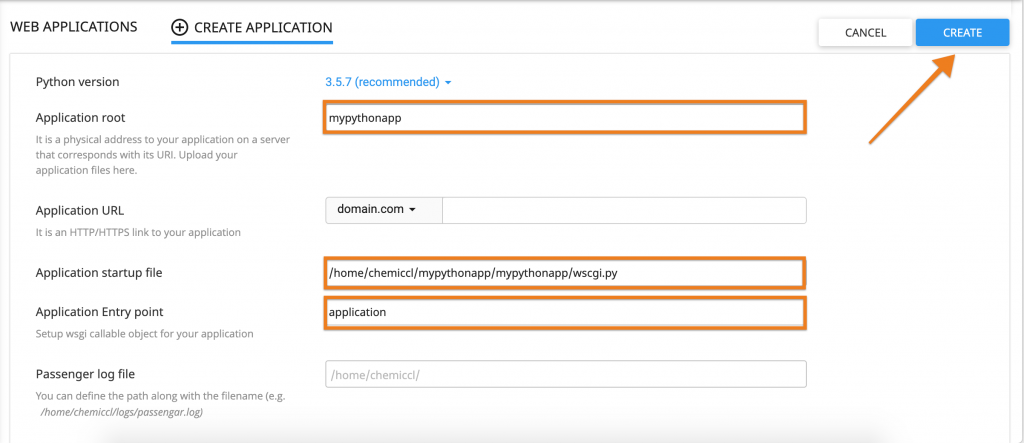
5) After you are done, click “CREATE” to finish setting up the app.
You have the command necessary to enter your virtual environment at the very start. This is useful when you need to manually execute some commands either via SSH or with the terminal menu in cPanel.
6) Click Run Pip Install to install your app dependencies
You can additionally set up Environment variables:
Click Add Variable and you will be able to set up the Name and Value of the variable in question. After you have entered the correct data, click Done to create the variable.
7) When everything is done, Save and RESTART your app.
That’s a wrap! Now you know how to set up a Python app using the cPanel.